
GAME UI DESIGN
I design and implement UI/UX systems for mobile apps, games, and VR experiences, with a focus on clarity, usability, and real-time integration in engine.
- Xenoshyft (2015) -
Overview
Designed UI systems and visual assets for the Steam release of Xenoshyft, a multiplayer deck-building strategy game. Focused on translating a complex tabletop-style experience into a clean, readable digital interface that supports both strategic planning and real-time decision making.
The Problem
The core challenge was adapting a dense, information-heavy deckbuilder into a mobile-friendly format without sacrificing clarity or usability.
-
Cards, stats, and abilities needed to remain readable at small sizes
-
Players needed visibility into multiple game states (hand, field, other lanes)
-
Lobby and pre-game flows required space for strategy discussion and lane selection
-
UI had to maintain the Xenoshyft sci-fi brand while sitting clearly on top of detailed backgrounds


Image From Boardgame Geek
The Approach
I focused on reducing cognitive load while preserving strategic depth.
-
Developed wireframes and user flows in Balsamiq to map navigation across game states
-
Designed layouts that allow players to quickly scan cards and board state
-
Simplified complex systems by converting visual counters (tokens, trackers) into clear numerical displays
-
Structured UI to support zoom in/out interactions, allowing players to shift between detailed and high-level views
Collaboration with a UX engineer ensured that designs translated effectively into functional systems within the game.
Visual & Interaction Design
-
Established clear information hierarchy for card data, abilities, and player actions
-
Designed UI elements that balance visual appeal with readability
-
Maintained consistent sci-fi styling across menus, HUD, and store interfaces
-
Created modular UI components that could scale across different screen sizes


Buttons (Used with 9-Slice)

Exit

Button (Activated)


Icons

Text Field (For In-Game Message)
Implementation
-
Delivered production-ready UI assets (PNG/SVG) optimized for engine integration
-
Designed 9-slice scalable UI elements to support flexible layouts across resolutions
-
Prepared assets for use in Unity, ensuring usability for engineering integration
-
Applied visual treatments (glows, shadows, layering) to maintain legibility over complex backgrounds


Key Challenge & Solution
Challenge: Presenting large amounts of gameplay data in limited screen space without overwhelming the player
Solution:
-
Prioritized typography and spacing
-
Grouped related information into clear visual clusters
-
Enabled zoom-based interaction to manage information density
Outcome
-
Delivered a UI system that supports both strategic depth and usability
-
Improved player readability across complex gameplay scenarios
-
Maintained strong visual cohesion with the Xenoshyft brand
- Cosmos Coaster (2018) -
Overview
Designed and implemented immersive UI systems for Cosmos Coaster VR, a rail-based VR experience. Focused on creating intuitive, readable interface elements that enhance immersion while providing real-time feedback within a moving 3D environment.
The Problem
The experience required an in-vehicle UI that could:
-
Clearly communicate which planetary environment the player is in
-
Provide real-time feedback (speed, progression) during motion
-
Integrate seamlessly into a 3D VR cockpit environment
-
Remain readable and comfortable during continuous movement
Additionally, the UI needed to reinforce the sci-fi atmosphere while avoiding visual clutter or discomfort in VR.
The Approach
I approached the UI as part of the physical space, not just an overlay.
-
Designed a dashboard-style interface embedded within the cart
-
Created a progression system using planetary icons, allowing players to track their journey
-
Introduced environmental feedback systems (e.g., color shifts based on planetary temperature) to reinforce immersion
-
Balanced readability with motion by simplifying shapes, spacing, and animation

Concept Art Overlay On In-Game Screenshot
Visual & Interaction Design
-
Designed a planet progression indicator, with current levels highlighted for clarity
-
Developed a speed gauge system tied directly to gameplay values
-
Integrated 3D planet representations to enhance spatial awareness
-
Used color and iconography (hot/cold indicators) to reinforce environmental storytelling


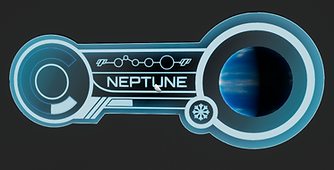

Widget and UMG Layout, with blueprint testing variations.
Implementation
-
Built UI systems using Unreal Engine UMG and Widget Blueprints
-
Assembled UI elements (frames, indicators, gauges) into modular widget systems
-
Integrated UI into the game via Blueprints, including:
-
Dynamic swapping of planet meshes per level
-
Real-time updates to speed indicators based on gameplay values
-
Created animated UI elements using material shaders and flipbook techniques
-
Optimized assets for performance:
-
Reduced texture sizes (512 and below)
-
Simplified shaders to minimize rendering cost
-
Used low-poly 3D assets adapted for UI display

UI implemented in-game
Key Challenge & Solution
Challenge: Maintaining UI readability and comfort within a moving VR experience
Solution:
-
Anchored UI elements within the environment for stability
-
Used scale and contrast to improve legibility at varying distances
-
Reduced visual noise to keep focus on essential information
Outcome
-
Delivered fully implemented, in-engine UI systems for VR
-
Enhanced player immersion through integrated environmental feedback
-
Created performant UI solutions optimized for real-time VR experiences
